Watch the lecture. Margin writes the notes.
It sits beside the video on Udemy, Coursera, YouTube or any page with one, keeps the lecture's own slides, follows what is said, and when the lecture ends writes a study note into your Obsidian vault: the idea first, then the slides, diagrams, formulas, questions, and the lecture's code, already run.
Free and open source · Chrome, Edge, Brave or Arc · Linux works too
What happens while you watch
You press play and forget about it. These are the real screens, from a short demo lecture on how RAG works.
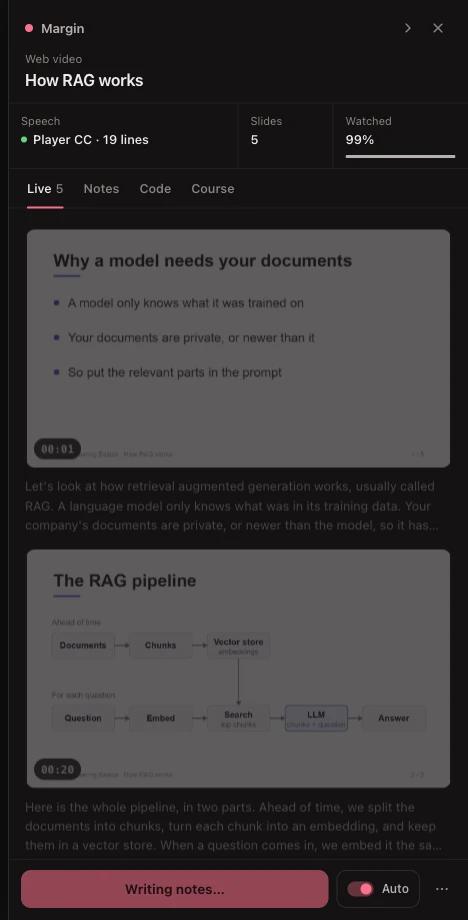
Each slide is kept the moment it finishes building: one picture however many bullets it adds, with what was said over it. A lecturer's face in a corner bubble does not fool it.
Notes you can trust, in the shape of a course
Not a summary of a transcript. A study note, and a course's worth of them that read in order.
Faithful to the lecture
Margin adds understanding, never content: analogies, diagrams and questions, but no facts, formulas or code the lecture does not have. Anything it makes up, like an example with its own numbers, says so.
One note, however you watch
Start in the middle, reload, skip, rewatch: it all builds one record. A later watch that catches a slide you skipped rewrites the same note, and your own edits in Obsidian are never overwritten.
Lectures you already watched
Halfway through a course before you found Margin? It writes those notes from the lectures' captions in one click, and adds their slides if you watch one again.
A course, not a pile of files
Numbered notes linked previous and next, a course index with a line on each, one notebook for the course's code, and YouTube playlists treated as courses.
Any model you already have
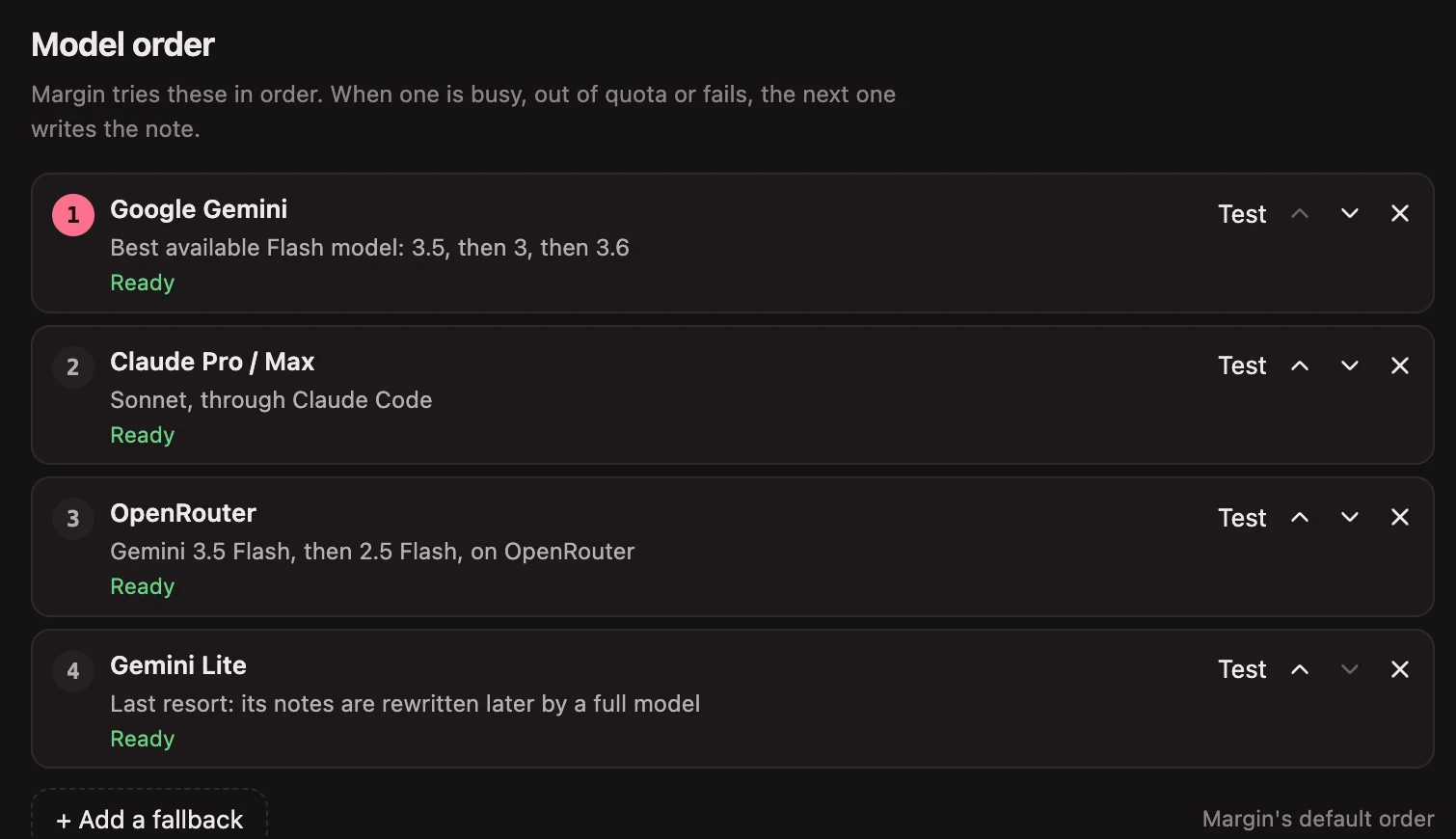
Put them in order. When the first is busy or out of quota, the next one writes the note, so a note never waits on one company's bad afternoon.
- Free
- Google GeminiA free key is all you need to start.
- Subscriptions
- Claude, ChatGPT, Google, Cursor, GitHub Copilot, OpenCode, QwenThrough each company's own signed-in tool. At most 30 notes a day each, so most of your plan stays yours.
- API keys
- OpenAI, Anthropic, Groq, Mistral, xAI, OpenRouter and 200+ moreSaved on your Mac, readable only by you, never shown again.
- On your Mac
- Ollama, LM Studio, llama.cpp, vLLM, JanNothing leaves your computer. Slower, and most cannot see slides.
Install it in about five minutes
Margin is two parts: a Chrome extension, and a small helper on your Mac that writes the notes. The installer sets up the helper; Chrome loads the extension.
Download and unzip
Get margin.zip and unzip it somewhere it can stay, like Documents. Chrome loads Margin from this folder, so do not delete it afterwards.
Run the installer
Open Terminal, type
cdand a space, drag the unzippedmarginfolder onto the window, press Return, then run:./install.shIt asks where to save your notes (a folder in your Obsidian vault is best), sets everything up, and starts the helper at every login, so you never need Terminal again.
Load it in Chrome
On the page that opens,
chrome://extensions: turn on Developer mode, click Load unpacked, and choose theextensionfolder inside it.Pick your models
Open any lecture. In the Margin panel, open ⋯ and then Settings. The quickest start is a free Gemini key; add a subscription or a model on your Mac whenever you like.
Needs Python 3.11 or newer; the installer checks and tells you how to get it. For lectures without captions,
brew install ffmpeg whisper-cpp lets Margin transcribe the audio on your Mac. If macOS asks whether
"Margin Sidecar" may access a folder, click Allow.
Questions
Is it free?
Yes, and open source under Apache-2.0, so you can use it anywhere, including at work. Notes cost whatever your model costs: nothing with a free Gemini key, a model on your Mac, or a subscription you already pay for.
What leaves my computer?
Captures and audio stay on your Mac. The only thing sent anywhere is the request for a note (the lecture's transcript and the chosen slides) to the model you picked, and with a model on your Mac, nothing at all. The helper answers only Margin itself, so websites cannot read your notes.
Will it capture every YouTube video I watch?
No. On YouTube, Margin stays a small tab until you press Capture this lecture, and stores nothing about a video before that. Udemy and Coursera lectures are captured on their own, because everything there is coursework. On any other site, use the toolbar button or Alt+Shift+M.
Does it work on Windows?
Not yet. It is built and tested on macOS; the helper also runs on Linux with scripts/start.sh.
Why is it not in the Chrome Web Store?
Margin needs its helper on your computer to write notes and run code, which a store extension cannot install. Loading it from the folder takes three clicks and keeps everything on your machine.
Something is not working.
The panel says what is wrong: the helper not running, no model set up yet, or a model that is busy. The troubleshooting guide covers each one, and issues are welcome on GitHub.